- 產生個別的 ssh keys
$ cd ~/.ssh
$ ssh-keygen -t rsa -C "account1@email.com" -f id_rsa_account1
$ ssh-keygen -t rsa -C "account2@email.com" -f id_rsa_account2
- 建立 config 檔
$ cd ~/.ssh
$ touch config
$ gedit config
編輯內容如下#account1 Host github.com-account1 HostName github.com User git IdentityFile ~/.ssh/id_rsa_account1 #account2 Host github.com-account2 HostName github.com User git IdentityFile ~/.ssh/id_rsa_account2 - 修改相對應 repo 的 remote url。例如:
$ cd /path/to/repo1
$ git remote set-url origin ssh://git@github.com-account1/account1/repo1.git
- 完成
2013年3月6日 星期三
多個 SSH Key 對應多個 Github 帳號
Git HTTP 協定的檔案大小限制
使用 git push 經由 HTTP 協定的時候要注意了,因為有檔案大小的限制,預設是 1MB。
發生的錯誤訊息如下所示:
發生的錯誤訊息如下所示:
$ git push
Counting objects: 199918, done.
Delta compression using up to 8 threads.
Compressing objects: 100% (188542/188542), done.
error: RPC failed; result=22, HTTP code = 413MiB | 53 KiB/s
fatal: The remote end hung up unexpectedly
Writing objects: 100% (199918/199918), 1.98 GiB | 7.61 MiB/s, done.
Total 199918 (delta 55401), reused 0 (delta 0)
fatal: The remote end hung up unexpectedly
fatal: expected ok/error,...
有兩種方式可以解決這個問題:
- 使用 SSH 來作為 git 的通訊。
- 加大 HTTP 檔案大小限制,如下:
git config http.postBuffer 524288000 #Set to 500MB
2013年1月31日 星期四
整合 Mantis 與 Gitolite
前陣子整合了公司的 mantis 和 gitolite,主要的目的就是要讓開發人員 push commits 到 gitolite 的時候,能夠同時更新 mantis 的 issue ,方便持續追蹤。
要完成這樣的功能,關鍵就在 git 的 post hooks,完整架構如下:
如上圖所示,當 gitolite 中的 git repo 收到開發人員的 commits 時,post hooks 會被呼叫,對應到的 hook 檔是 post-receive,與 svn 的 post-commit 不同,如下圖所示:
瞭解了大概的架構之後,開始著手進行 post-receive 的撰寫。Gitolite 共用的 hooks 檔案位於 "/usr/share/gitolite/hooks/common/*",找到我們要的 post-receive 後開始編輯。
這段 post hook 的目的是將收到的 git commit 資訊讀出來,然後餵給一隻 perl 程式來進行處理。撰寫完這個 hook ,還必須執行 gl-setup,這樣才會把這個 hook 放到每一個 git repo 下。
接下來,來看看 "/home/gitolite/git2mantis.pl" 做了什麼事情。
這隻 perl 程式的工作就是把收到的訊息,透過 ssh 的方式,傳送給遠端的程式並且執行。
就這樣,完成了簡易的 mantis 和 gitolite 的整合,可以使用 mantis 來追蹤 git 的開發過程了。
要完成這樣的功能,關鍵就在 git 的 post hooks,完整架構如下:
 |
| 整合 Mantis 與 Gitolite |
如上圖所示,當 gitolite 中的 git repo 收到開發人員的 commits 時,post hooks 會被呼叫,對應到的 hook 檔是 post-receive,與 svn 的 post-commit 不同,如下圖所示:
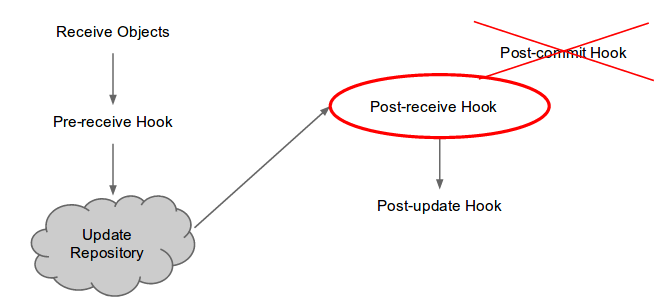 |
| Post hook 的過程 |
瞭解了大概的架構之後,開始著手進行 post-receive 的撰寫。Gitolite 共用的 hooks 檔案位於 "/usr/share/gitolite/hooks/common/*",找到我們要的 post-receive 後開始編輯。
# 讀取輸入的物件檔案
while read oldrev newrev ref
do
    # 取得 commit 資訊
    subj=`git show -s --format="%s" $newrev`
    diff=`git show $newrev...$oldrev`
    msgs="$subj
$diff"
    # 將資訊餵給用來跟 mantis 同步的 perl 程式
    /home/gitolite/git2mantis.pl "$msgs"
    ...
done
這段 post hook 的目的是將收到的 git commit 資訊讀出來,然後餵給一隻 perl 程式來進行處理。撰寫完這個 hook ,還必須執行 gl-setup,這樣才會把這個 hook 放到每一個 git repo 下。
接下來,來看看 "/home/gitolite/git2mantis.pl" 做了什麼事情。
#!/usr/bin/perl
#
# 使用者 mantis 的 ssh key 必須在 192.168.26.103 主機上設定好,
# 才能允許自動登入。
$host = "mantis@192.168.0.1";

$sshcmd = "/usr/bin/ssh ";
$phpcmd = "/usr/bin/php";

# mantis 的 checkin 程式
$checkincmd = "/var/www/mantis/scripts/checkin.php";

$msg = $ARGV[0];

# 透過 ssh 來執行遠端主機的程式
`$sshcmd $host $phpcmd $checkincmd <<< "$msg"`;
這隻 perl 程式的工作就是把收到的訊息,透過 ssh 的方式,傳送給遠端的程式並且執行。
就這樣,完成了簡易的 mantis 和 gitolite 的整合,可以使用 mantis 來追蹤 git 的開發過程了。
訂閱:
文章 (Atom)